| Copy Button Settings
|


|
|
| Clicking the Copy icon on the left pane in the Button Configuration window displays its current button settings on the right pane.
|
|
|
| The settings can be categorized into two: Printing Settings on the upper part, and Scan Parameters on the lower part.
|
|
|
| The items and parameters available in the window are explained as follows:
|
|
|

|
|
|
| Printing Settings
|
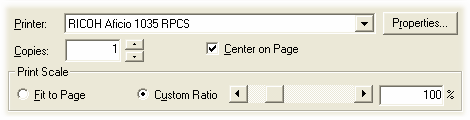
| Because all printers have their own printing characteristics and no two printers will give the exact same output (especially where colors and images are concerned), this Button Configuration window provides a number of options or settings, allowing you to adjust the scanning process to tailor the output to your particular printer. You will need to experiment with the settings to optimize the quality of the printed image.
|
|
|
|
|
|
| Printer
|
| All printers that are currently installed in Windows are displayed in the drop-down menu.
|
If needed, click  to configure the printer. to configure the printer.
|
|
|
|
|
| Copies
|
| This setting decides the number of copies to be printed. Do one of the following:
|
| · | Enter the numeral in the edit box directly; or
|
| · | Click  / /  to increase/decrease the number. to increase/decrease the number.
|
|
|
|
|
| Center on Page
|
| If the check box is ticked, the image will be centered in the printable area of the selected paper.
|
|
|
|
|
| Fit to Page
|
| If this option is selected, the print size of the image will be re-scaled to fit within the printable area of the selected paper.
|
|
|
|
|
| Custom Ratio
|
| This options allows you to re-scale the print size of the image proportionally by doing one of the following:
|
| · | Slide the thumb of the scroll bar to the right or left; or
|
| · | Click the arrow signs on the right and left ends; or
|
| · | Enter the value in the edit box.
|
|
|
|
|
|
|
| Scan Parameters
|
| · | Scan Type
|
| · | Split
|
| · | Page Size
|
| · | Scan Mode
|
| · | Document Type
|
| · | Brightness
|
| · | Contrast
|
| · | Gamma
|
| · | Threshold
|
| · | Color Dropout
|
| · | Descreen
|
| · | Filter
|
| · | Page Settings
|
| · | Continuous Scan
|
| · | Apply Color Matching
|
| · | Auto Density
|
| · | Auto Crop
|
| · | Multi-Crop (This function may or may not be available depending on the scanner model you purchase.)
|
| · | Auto Deskew
|
| · | Image Edge Fill
|
| · | Multi-image output (This function may or may not be available depending on the scanner model you purchase.)
|
| · | Remove Punch Holes (This function may or may not be available depending on the scanner model you purchase.)
|
| · | Remove Background
|
| · | Denoise
|
| · | Character Enhancement
|
| · | Global Settings
|
| · | Preview
|
| · | Default
|
|
|
| Also see:
|
 How do I configure the Copy button? How do I configure the Copy button?
|
|
|
|
|